3-Tier (Hierarchical) Design
If you're studying for the 350-401 exam, Section 1.1 is pretty much your starting line. Cisco absolutely loves testing people on this stuff because if you build a bad foundation, everything else crumbles.You can't just wing a massive enterprise network and hope for the best. You need a game plan. Let's skip the dry Cisco documentation and break down the exact design principles you need to know to pass the test and actually build networks that don't crash when things get busy.
This the most common type of design in Enterprise and Campus network enviroments. This is becuase its a realvitly simple and inexpensive design that scales well. It consist of Access, Distribution, and Core layer that each have a unnquie role in delvering network traffic through out your organizon. The core and distribution layers rely heavly on redundecy to support high levels up uptime. The 3-Tier (Hierarchical) Design serves as the ultimate blueprint for large-scale enterprise environments, earning a solid architecture rating of 8.5 out of 10.
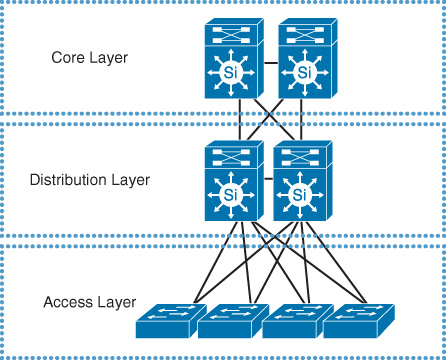
Image courtesy of Cisco Systems, Inc
Access Layer
The Access Layer consists of edge switches that physically connect directly to end-user devices (such as desktops, IP phones, wireless access points, and printers). This layer serves as the network’s first line of defense, where engineers assign VLAN membership to specific physical switch ports. It is the primary zone for enforcing edge security features, including port security, storm control, spanning tree guards (like BPDU guard), DHCP snooping, dynamic ARP inspection (DAI), IP source guard, and rate-limiting. Edge Switches are also responsible for Supplying power to PoE device such as IP cameras, phones and WAPs. Also you should note that this layer handles both North-South (user-to-internet) and East-West (user-to-local-server) traffic.
Layer 2 Access Design
Think of a Layer 2 Access Design as keeping things simple. Your edge switches stick purely to the OSI Data Link Layer, just passing traffic back and forth locally.
How it works: Switches build a standard MAC address table to move traffic inside the same VLAN. They don’t do any routing whatsoever.
The Gateway: All default gateways live upstream at the distribution or core layer. Because of that, you have to run VLAN trunks between all your layers to get traffic where it needs to go.
The Catch: You are stuck relying heavily on Spanning Tree Protocol (STP) to stop loops. That means perfectly good redundant ports get blocked, and a single broadcast storm can tank a huge chunk of your network.
Best For: Small to medium businesses that want to save cash and prefer simple, out-of-the-box setups without the complexity of routing at the edge.
Layer 3 Access Design
Instead of keeping all the heavy lifting in the core, a Layer 3 Access Design pushes the routing brains right out to the edge switches.
How it works: Every closet switch acts as a mini-router, running dynamic protocols like OSPF or EIGRP to figure out the best paths for traffic.
The Gateway: Your default gateway sits right at the edge switch instead of upstream. This means uplinks become clean, routed point-to-point links rather than messy, trunked VLANs.
The Benefit: It completely kills off Spanning Tree loops and stops ports from getting blocked. If something breaks, the network recovers in milliseconds and keeps the blast radius contained.
The Catch: Moving gateways down means security ACLs have to live on every single access switch. Managing all those rules is a huge headache, and you can easily max out the limited TCAM memory on cheaper edge hardware.
Best For: Big enterprise campuses that need bulletproof uptime, fast recovery, and easy scaling across multiple buildings.
Distribution Layer
The Distribution Layer consists of high-performance switches designed to aggregate multiple access layer switches and enforce network policies such as Access Control Lists (ACLs), intervlan routing via Switched Virtual Interfaces (SVIs) or any or hardware calulations before forwarding traffic. Southbound to another access switch to another end user device. Northbound to the Core to go another site or internet. This is also the layer where communications turn from LAYER 2 to LAYER 3 (routing).
Core Layer
The Core Layer consists of high-end backbone switches and routers designed to interconnect multiple distribution blocks, buildings, or remote sites. As the high-speed backbone of the network, it provides the ultimate path for North-South internet transit and East-West inter-site communications. To maintain maximum throughput and ultra-low latency, the Core should have minimal Access Control Lists (ACLs) or intensive network policies. This keeps the Core’s processing power strictly focused on performing high-speed Layer 3 routing as efficiently as possible.
When would you use this design?
You use a 3-tier (hierarchical) network design for large enterprise campus networks and multi-building organizations where you need high scalability, predictable performance, modular growth, and simplified troubleshooting.
Scalability
The scalability of a 3-Tier (Hierarchical) Network Design is exceptionally high, earning a rating of 9 out of 10.
Why does it score this high?
Modular Structure: You can add new access layer switches without affecting the core.
Predictable Growth: Network expansion follows a repeatable block-based blueprint.
Role Separation: Splitting core, distribution, and access functions prevents performance bottlenecks.
Easy Upgrades: You can upgrade individual layers independently as traffic increases.
Why not a 10?: Massive modern data centers can face East-West traffic bottlenecks, often requiring a Spine-Leaf architecture instead.
Complexity & Cost
The Complexity & Cost profile of a 3-Tier (Hierarchical) Network Design sits at a moderate-to-high level, earning a rating of 7 out of 10.
Why does it score this high?
Hardware Expenses: Separating core and distribution layers requires a substantial investment in specialized, high-throughput switches and advanced multilayer hardware.
Configuration: Managing three separate layers forces IT teams to configure complex routing protocols, security policies, and redundancy mechanisms across multiple boundaries.
Cabling: Cost is heavily optimized by connecting access switches only to upstream distribution pairs, keeping bulk wiring minimal and organized.
No Interconnected Access: Eliminating switch-to-switch links at the access layer avoids a chaotic, expensive mesh network while maintaining clear fallback paths.
Predictable Troubleshooting: The highly structured design prevents messy, unpredictable network behaviors
Performance Limitations
The Performance Limitations of a 3-Tier (Hierarchical) Network Design are relatively low but present, earning a rating of 3 out of 10 (where 10 represents severe limitations).
Why does it score this low?
East-West Traffic Bottlenecks: Modern data center traffic flows heavily between servers (East-West), which forces data up and down multiple tiers, causing latency.
Bandwidth Planning: Traffic is highly aggregated as it moves upstream, creating potential choke points if the bandwidth ratio between layers is poorly planned.
Latency Penalties: Data packets must pass through multiple switch hops (Access to Distribution to Core) to reach other segments, introducing minor propagation delays.
2-Tier (Collapsed Core) Design
The 2-Tier (Collapsed Core) Design acts as a highly efficient variation of the traditional 3-Tier model, earning an impressive rating of 8.5 out of 10 for mid-sized enterprise networks.
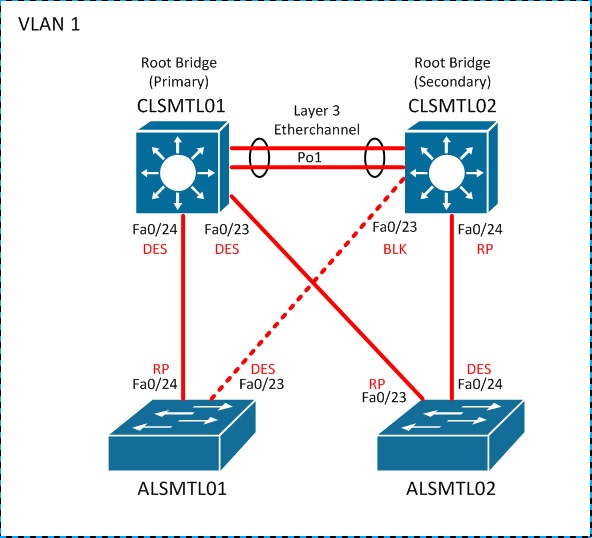
Image courtesy of Cisco Systems, Inc
When would you use this design?
The 2-Tier (Collapsed Core) Design is most effective when applied to specific organizations that are smaller and cant justify the budget.
Small to Medium Businesses: Ideal for organizations with fewer than 200 to 500 users where a dedicated, separate core layer is economically unjustifiable.
Single-Building Campuses: Perfect for environments where all network infrastructure is housed under one roof, eliminating the geographic need for a middle distribution layer.
Budget-Constrained Projects: Highly suited for deployments with strict capital expenditure limits that still require enterprise-grade reliability and performance.
Limited IT Staffing: Best for teams with fewer network administrators, as managing a 2-tier structure significantly lowers daily operational and configuration workloads.
Low Inter-VLAN Routing Demands: Excellent for environments where the majority of traffic is outbound to the internet or a specific cloud service rather than heavily routed between internal departments.
Scalability
The Scalability of a 2-Tier (Collapsed Core) Design is moderately effective but strictly bounded, earning a rating of 5 out of 10 (where 10 is unlimited scalability).
Why does it score a 5?
Rapid Small-Scale Growth: It allows you to easily plug in new access layer switches to accommodate more users up to a certain physical threshold.
Simplified Expansion Blueprint: Adding new network segments remains easy and predictable because there are no complex distribution routing boundaries to reconfigure.
Port Density Ceiling: The design hits a hard wall when the collapsed core switches physically run out of available downlink ports to connect new access switches.
CPU and Memory Bottlenecks: As more access switches are added, a single pair of core switches must handle all routing tables, security policies, and inter-VLAN traffic, creating hardware strain.
Uplink Bandwidth Aggregation: Traffic from every new user groups together upstream, which can easily saturate the links to the collapsed core if the business expands unexpectedly.
Complexity & Cost
The Complexity & Cost profile of a 2-Tier (Collapsed Core) Design is highly optimized for budget-conscious organizations, earning a rating of 3 out of 10 (where 10 is the most complex and expensive).
Why does it score this low?
Drastic Hardware Savings: Collapsing the core and distribution functions into one layer cuts the required number of high-end enterprise switches nearly in half.
Minimized Licensing Fees: Fewer physical chassis mean a direct reduction in expensive software features, routing licenses, and vendor support contracts.
Configurations: IT staff only manage two physical boundaries, drastically reducing the time spent configuring VLANs, basic routing protocols, and access control lists.
Low Cabling Overhead: Removing an entire structural tier eliminates massive runs of backbone fiber or high-speed copper interconnects between layers.
Faster Deployment Times: The simplified architecture allows small engineering teams to stage, test, and deploy the entire network environment in a fraction of the time.
Performance Limitations
The Performance Limitations of a 2-Tier (Collapsed Core) Design are highly visible when pushed past its intended limits, earning a rating of 6 out of 10 (where 10 represents severe performance bottlenecks).
Why does it score this high?
Shared Resource Strain: A single pair of switches handles both high-speed core switching and heavy distribution routing policies simultaneously, which can max out switch CPU and memory.
Aggregated Traffic Bottlenecks: Without a middle distribution layer to filter and break up traffic locally, all inter-VLAN routing must travel all the way to the core, risking link saturation.
Oversubscription Vulnerability: As more access switches connect directly to the core, the ratio of user access traffic to core uplink bandwidth grows dangerously high.
Larger Broadcast Domains: Layer 2 boundaries often extend further in this design, forcing switches to process more background broadcast traffic (like ARP requests), which drains performance.
Spine-Leaf Design
The Spine-Leaf Design serves as the premier architecture for modern, high-throughput data centers, earning an amazing rating of 9.5 out of 10.
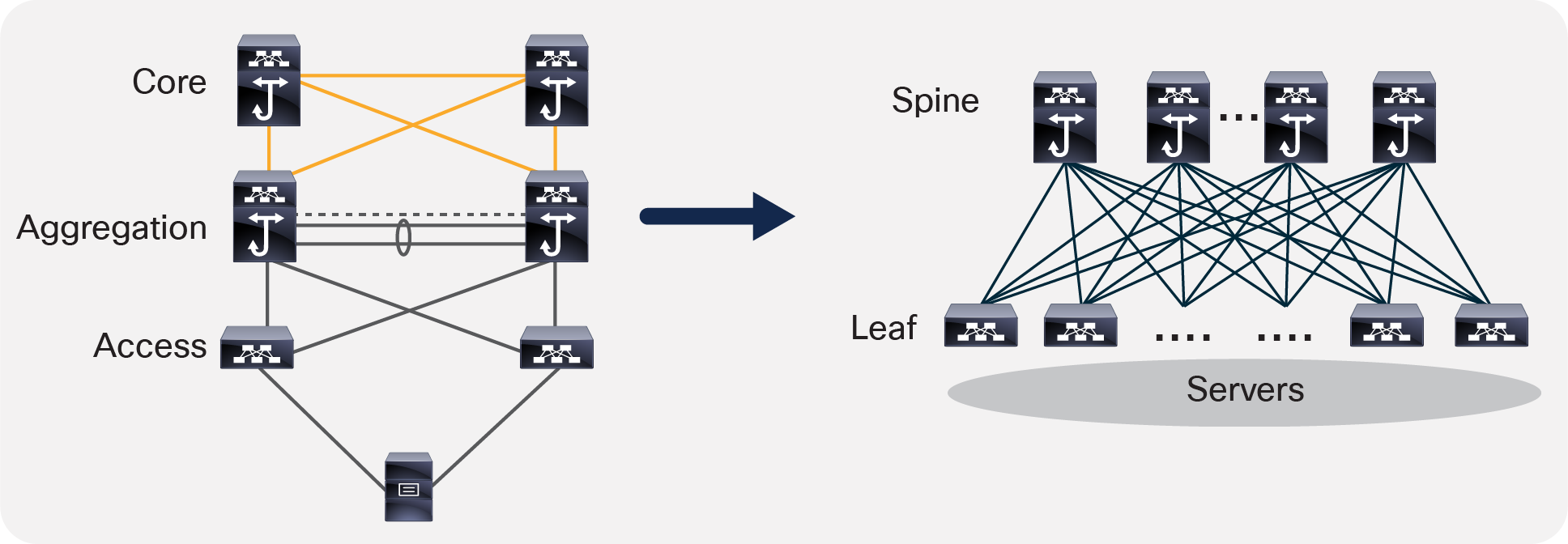
Image courtesy of Cisco Systems, Inc
When would you use this design?
Modern Data Centers: Ideal for environments running massive server virtualization, containerized applications, or private cloud environments.
Heavy East-West Traffic: Perfect for application architectures where servers must constantly talk to other servers, database clusters, or storage nodes directly.
Ultra-Low Latency Needs: Highly suited for high-frequency trading platforms, real-time analytics engine processing, and live streaming infrastructures.
High-Performance Computing (HPC): Best for artificial intelligence cluster training, big data pools, and distributed computing tasks requiring massive parallel bandwidth.
Scalability
The Scalability of a Spine-Leaf Design is exceptionally powerful but follows a highly unique engineering model, earning a rating of 9 out of 10.
Why does it score this high?
Linear Bandwidth Growth: If the network runs low on throughput, you can just add another spine switch to scale out horizontal bandwidth across all nodes instantly.
Simple Port Expansion: If you need to connect more servers or storage arrays, you just plug in an additional leaf switch without disrupting any live configurations.
Predictable Hops at Scale: No matter how big the network gets, every leaf switch stays exactly two hops away from any other leaf switch, keeping latency uniform across the whole data center.
Massive ECMP Load Balancing: It scales out using ECMP routing protocols, meaning the network can seamlessly use up to 16, 32, or even 64 active parallel paths for traffic at the same time.
Independent Layer Scaling: The layers are totally separate; you scale your server capacity (Leaf) completely independently from your network transport capacity (Spine).
Complexity & Cost
The Complexity & Cost profile of a Spine-Leaf Design is exceptionally high, earning a rating of 8.5 out of 10 (where 10 is the most complex and expensive).
Why does it score this high?
Cabling Costs: Since every leaf switch has to connect to every single spine switch, you end up with a massive, expensive web of high-speed fiber cables and transceivers.
Hardware Requirements: You can’t use cheap gear here. It relies completely on high-density, data-center-grade switches with advanced chips, huge buffers, and fast ports (like 40G, 100G, or 400G+), which cost a premium.
Design Calculations: Planning requires precise math for port totals and oversubscription ratios up front. If you make a mistake, you easily end up with wasted ports or run out of hardware room too early.
Specialized Operational Skills: Managing a software-defined fabric requires high-level network engineering skills, automation scripting, and knowing how to use specific data center operating systems. IT teams can’t just use basic setups. They have to deploy and manage advanced routing systems like BGP, IS-IS, OSPF, or VXLAN overlays.
Performance Limitations
The Performance Limitations of a Spine-Leaf Design are minimal but highly specific, earning a rating of 3 out of 10 (where 10 represents severe performance bottlenecks).
Why does it score this low?
North-South Exit Bottlenecks: The whole design is built for server-to-server traffic. If data needs to leave the data center to go to the internet or campus, it can hit a choke point at the border switches handling the exit links.
Oversubscription at the Spine: Even though latency is the same everywhere, if too many leaf switches blast max traffic to the spine switches at the same time, you can get lag if you didn’t buy enough spine bandwidth.
Strict Layer 3 Routing Dependencies: Since this design gets rid of Spanning Tree and uses routing protocols like BGP or OSPF instead, any bad configuration timers can cause dropped packets across the network.
No Direct Leaf Communication: Even if two servers are physically right next to each other on different leaf switches, they aren’t allowed to talk directly sideways. They always have to go up to a spine switch and back down, which adds extra steps for local traffic.
Campus Fabric Design
The Campus Fabric Design (excluding Cisco SD-Access) serves as a modern, open-standard framework for building highly scalable campus environments, earning a solid architecture rating of 8 out of 10.
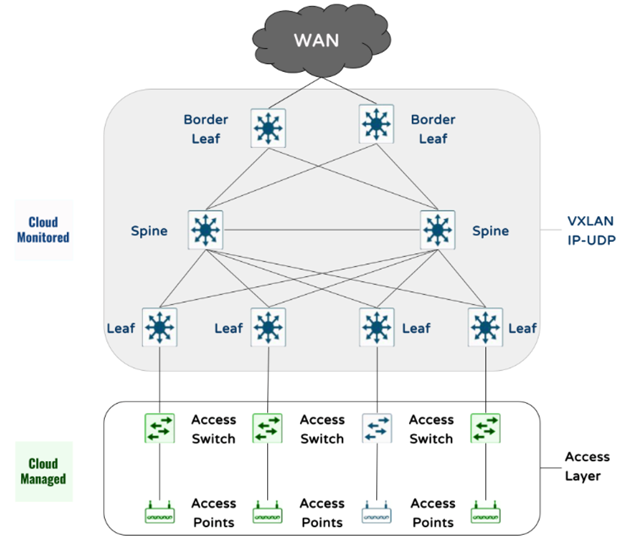
Image courtesy of Cisco Systems, Inc
When would you use this design?
Multi-Vendor Environments: Perfect if your campus uses a mix of different hardware vendors (like Cisco, Juniper, and Aruba) and you need an open standard like BGP EVPN/VXLAN to make them all work together.
Heavy IoT and Guest Isolation: Ideal for environments like universities, hospitals, or large offices that need to segment thousands of untrusted IoT devices, medical gear, or guest users away from core corporate assets.
Large Multi-Building Sites: Excellent for massive corporate headquarters or college campuses where users roam between buildings but need to keep their same IP address and security policies seamlessly.
No Controller Lock-in: Best for engineering teams that prefer complete control over their configurations using standard CLI or open automation tools (like Ansible) rather than being forced to buy expensive proprietary software controllers.
Legacy App Requirements: Highly suited for organizations that have old applications requiring a shared Layer 2 subnet stretched across completely different geographical areas or buildings.
Scalability
Scalability (Rating: 8.5/10)
Why does it score this high?
Massive Anycast Scaling: Since the default gateways live on every single access switch at the same time, you can grow the network across a bunch of buildings without running out of IP space or dealing with massive broadcast storms.
Easy Node Expansion: You can just drop a new access switch anywhere on campus, plug it into your Layer 3 backbone, and instantly roll out all your corporate networks and security rules to that spot.
Seamless IP Roaming: It separates a device’s IP from its physical location using VXLAN. This means users can walk across the whole campus with the exact same IP address without dropping their active connections.
Easy Segmentation Scaling: You can build thousands of virtual networks (VNIs) over one physical setup, making it super easy to scale your isolation policies for new departments or devices.
Complexity & Cost
Complexity & Cost (Rating: 8/10)
Why does it score this high?
Massive Configuration Overhead: Since you are skipping a central controller, you have to manually code complex BGP EVPN, VXLAN tunnels, and Route Targets on every single switch via CLI. One typo can break the whole fabric.
Premium Software Licensing: Even though you save money by avoiding proprietary hardware controllers, vendors still force you to buy top-tier advanced routing or enterprise software licenses to unlock VXLAN and BGP features.
High-End Hardware Requirements: You can’t just deploy basic access switches. Every switch at the edge needs specialized ASICs that are powerful enough to handle hardware-based VXLAN encapsulation and de-encapsulation.
Steep Learning Curve: Your IT team can’t just know basic VLANs and static routing. They need advanced, data-center-level engineering skills to troubleshoot multi-protocol BGP issues and overlay/underlay routing syncs.
Intense Upfront Design Time: You have to map out a precise blueprint for your IP fabric, underlay routing protocols, and VNI/VLAN mappings before you buy anything, or you will run into massive deployment headaches.
Performance Limitations
Performance Limitations (Rating: 4/10)
Why does it score this low?
Encapsulation Overhead: Wrapping every single user packet in a VXLAN header adds extra bytes to the data. If you don’t increase your MTU size across the campus switches to handle this jumbo frame traffic, you will hit performance lag or packet fragmentation.
Control Plane CPU Drain: Since all the switches have to talk to each other using BGP EVPN to map out where MAC and IP addresses live, a massive wave of users logging on at the same time can cause a temporary spike in switch CPU usage.
Multicast Replication Under Load: If you don’t configure full multicast routing in your underlying network, the switches have to use “ingress replication” to duplicate broadcast traffic (like ARP). This can easily bog down link bandwidth when the campus gets busy.
Gateway Handoff Choke Points: While roaming inside the fabric is lightning fast, if tons of users try to burst heavy traffic outside the fabric to the internet or an external firewall all at once, those specific exit border switches can get bogged down.
SD-Access
The Cisco SD-Access (Software-Defined Access) Design serves as a highly automated, enterprise-grade campus network architecture, earning a rating of 8.5 out of 10.
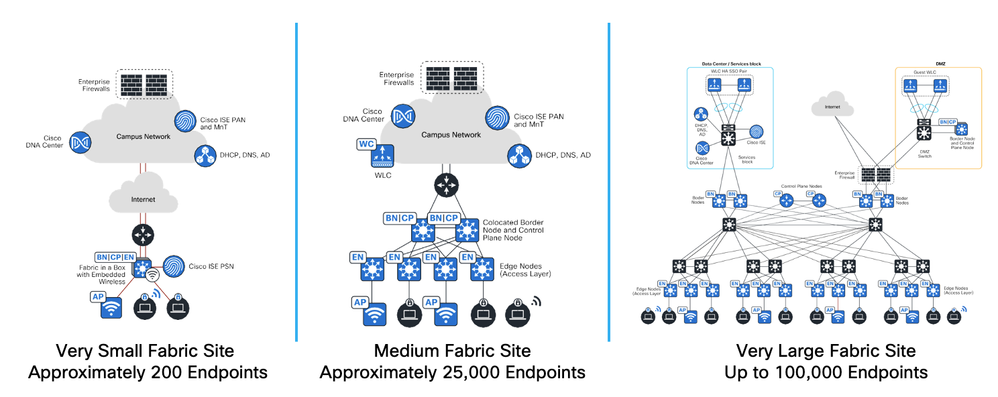
Image courtesy of Cisco Systems, Inc
Control Plane Node: The network’s “brain” or address book. It runs a database protocol called LISP to keep track of exactly where every user and device is located across the campus.
Border Node: The network’s “exit gate.” This switch connects the internal fabric to the outside world, like your internet routers, data centers, firewalls, or old non-fabric networks.
Edge Node: The network’s “front door.” These are your access layer switches where end-user devices, laptops, printers, and Wi-Fi access points physically plug in.
Fabric Wireless LAN Controller (WLC): The Wi-Fi manager. It hooks into the control plane node so that roaming wireless users can drop and pick up connections instantly without losing their IP address.
Cisco ISE (Identity Services Engine): The network’s “security guard.” It handles authentication (like 802.1X) when a device plugs in, figures out who the user is, and hands them their security tag (SGT) to lock down what they can access.
Cisco Catalyst Center (formerly DNA Center): The network’s “cockpit.” This is the single central software controller and GUI dashboard where you design, automate, and troubleshoot the entire fabric without ever opening a CLI terminal.
When would you use this design?
Strict Security and Compliance: Perfect for environments like banks, hospitals, or government buildings that need airtight security. SGT tags ensure that sensitive data stays locked down based on user identity, not just an IP address.
Large, Fast-Growing Campuses: Ideal for massive corporate offices or universities where managing thousands of users, Wi-Fi access points, and IoT devices manually through the CLI would take too much time.
All-Cisco Shops: Highly suited if your organization already buys Cisco hardware (like Catalyst 9k switches) and wants to unlock the full automated capabilities of Cisco Catalyst Center.
Centralized IT Management: Excellent for teams that want a single dashboard to manage, troubleshoot, and push global network configurations across multiple geographic locations instantly.
Dynamic User Environments: Great for workspaces where employees constantly change desks, departments, or buildings but need their specific access policies and networks to follow them seamlessly.
Scalability
Scalability (Rating: 9.5/10)
Why does it score this high?
Automated Database Management: Because it uses LISP in the control plane, switches don’t have to flood the network to find devices. They just query the central address book, which allows the network to scale up to tens of thousands of endpoints cleanly.
Effortless Campus-Wide Roaming: Since user identities are totally decoupled from their physical locations, employees or Wi-Fi devices can roam across different buildings or floors instantly without dropping active sessions or changing IP addresses.
Global Security Tagging: SGT policies are managed centrally through Cisco ISE and pushed out everywhere automatically. This means your security rules scale effortlessly across the entire network without you needing to write thousands of messy ACL lines.
Single-Click Switch Provisioning: Expanding the physical footprint is dead simple. You just mount a new edge switch, cable it up, and use Catalyst Center to push a pre-made template that configures everything automatically in minutes.
Intent-Based Policy Replication: You can scale out complex virtual networks (VNIs) for new departments or guest isolation globally across multiple campus sites from a single centralized dashboard.
Complexity & Cost
Complexity & Cost (Rating: 9/10)
Why does it score this high?
Licensing Costs: Cisco forces you to buy expensive, recurring DNA Advantage or Premier software subscriptions for every single switch and wireless controller in the fabric on top of the upfront hardware costs.
Proprietary Hardware Lock-In: You can’t mix and match gear to save money. The fabric requires specific enterprise-grade Cisco Catalyst hardware (like the Cat 9k series) and high-performance server appliances to run Catalyst Center and Cisco ISE.
Massive Server Footprint: To even get the fabric running, you have to host heavily clustered server deployments for Catalyst Center and ISE. These require a ton of rack space, power, and compute resources just to act as the management plane.
Behind-the-Scenes Protocol Mess: While the GUI makes it look easy, underneath the hood you are running an incredibly complex stack of protocols simultaneously—including LISP, VXLAN, Cisco TrustSec, and CTS/SGT tagging.
Engineers Must Learn a Whole New System: Your IT team can’t just rely on traditional CLI troubleshooting anymore. They have to learn the inner workings of Cisco’s software automation, API integrations, and GUI workflows, which takes serious training.
Performance Limitations
Performance Limitations (Rating: 4.10)
Why does it score this low?
LISP Lookup Delay: Because it relies on a central control plane node to track down where user devices live, the very first packet sent to a new destination can experience a minor lookup delay while the switch checks the address book.
Controller Dependency Risks: If your Catalyst Center or ISE server clusters crash or lose connectivity, the existing traffic keeps flowing, but the network loses the ability to onboard new users, change security rules, or update device profiles.
SGT Policy Enforcement Strain: Parsing Scalable Group Tags (SGT) inline inside hardware packets requires significant switch hardware resources. If you write overly massive, poorly planned security matrices, you can hit policy capacity limits on your edge switches.
Jumbo Frame MTU Requirements: Wrapping user data inside automated VXLAN headers adds packet overhead. If you forget to crank up the MTU size across your underlying network devices, you will cause packet fragmentation and severe throughput drops.
Cloud Network Design
The Cloud Network Design profile serves as the foundational architecture for modern internet-scale applications and flexible corporate infrastructure, earning a stellar overall adaptability rating of 9.5 out of 10.
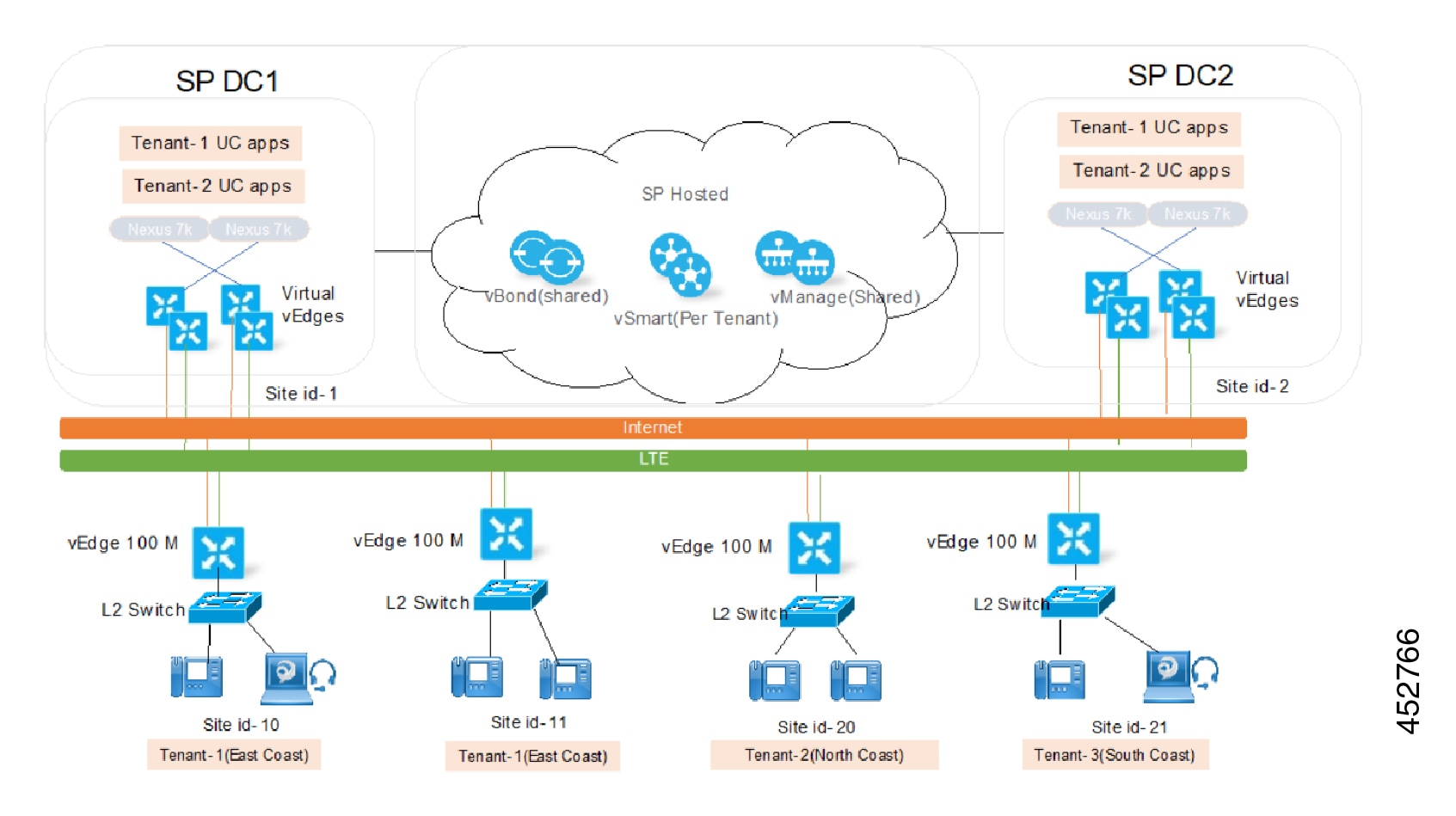
Image courtesy of Cisco Systems, Inc
When would you use this design?
Rapidly Growing Startups: Perfect if you need to build a global application from scratch on day one without spending thousands of dollars on physical routers and switches upfront.
Unpredictable Web Traffic: Ideal for businesses with huge traffic spikes—like e-commerce sites on Black Friday or streaming platforms—where the network needs to scale up instantly and shrink back down later.
Global App Deployments: Excellent when your users are scattered across the world and you need to deploy virtual load balancers and networks across multiple countries simultaneously to keep latency low.
Disaster Recovery and Backup: Highly suited for companies that want a reliable backup site without paying for a second physical data center to sit empty most of the time.
DevOps and Automation Shops: Best for modern engineering teams that treat infrastructure as code (IaC), using tools like Terraform to launch, tear down, and test networks completely through automation.
Scalability
Scalability (Rating: 10/10)
Why does it score this high?
Infinite Resource Pooling: You never have to worry about running out of physical ports or chassis slots. If you need 50 new virtual routers or a dozen load balancers, the cloud fabric provisions them instantly from a virtually bottomless hardware pool.
On-Demand Auto-Scaling: The network works hand-in-hand with your applications to automatically scale bandwidth, firewalls, and gateways up or down in real time based on active traffic load without human intervention.
Global Infrastructure Replication: You can duplicate your entire network layout across different continents in minutes. This lets you scale horizontally to new global markets by just copying your configuration code to another cloud region.
Zero Downtime Upgrades: Because the underlying physical hardware updates are handled entirely behind the scenes by the provider, you can scale up your bandwidth capacities and processing tiers without scheduling maintenance windows or dropping user packets.
Massive Routing Tables: Cloud routing engines are built to handle internet-scale traffic effortlessly. You can peer with massive external networks or absorb giant routing tables without frying a physical switch’s onboard memory.
Complexity & Cost
Complexity & Cost (Rating: 7.5/10)
Why does it score this high?
Data Egress Fees: While putting data into the cloud is free, cloud providers charge you for every single gigabyte that leaves their network (egress costs). If you have high-traffic apps, these data transfer fees can make your monthly bill skyrocket unpredictably.
Complex Multi-Account Architectures: As your company grows, managing connections between dozens of different virtual private clouds (VPCs), transit gateways, and third-party security appliances quickly turns into a massive logical maze.
Invisible Feature Pricing: Cloud vendors charge you for every little thing—every virtual interface, every NAT gateway hour, and every public IP address. If you don’t keep an eye on your dashboard, you can easily rack up a massive bill for idle resources you forgot to delete.
The Cloud Skills Gap: It requires a unique set of skills. Your engineers can’t just know traditional networking; they have to master cloud-specific routing limitations, identity access management (IAM) security policies, and API integrations.
Configuration Drift Risks: Because it is so easy to click a button and change a network setting in the web console, teams often accidentally bypass their official documentation or code templates, leading to messy, untracked security holes.
Performance Limitations
Performance Limitations (Rating: 5/10)
Why does it score this high?
The Noisy Neighbor Effect: Since you are sharing physical hardware with other companies in the cloud provider’s data center, another company’s massive traffic spike can occasionally slow down your network speeds.
Unpredictable Internet Latency: Because your data travels over the public internet to reach your cloud resources instead of over local office cables, your connection speeds can fluctuate depending on internet traffic congestion.
Strict Gateway Throughput Caps: Cloud virtual appliances—like NAT gateways or VPN endpoints have built-in bandwidth limits (e.g., 5Gbps or 10Gbps). If your traffic beats those limits, your data hits a hard wall unless you set up multiple gateways to split the load.
Hidden Multi-Region Latency: If your database lives in one cloud region (like Virginia) and your app server lives in another (like Ireland), the physical distance introduces a mandatory speed-of-light delay that slows down every database query.
Less Used Designs (Star, Mesh, Bus, Ring)
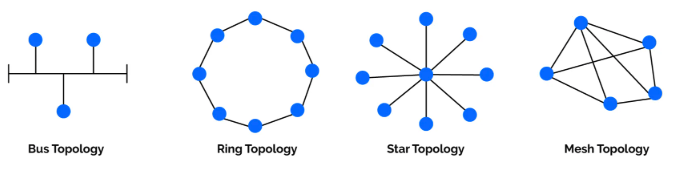
Star Topology (Rating: 8/10) How it works: Every device plugs directly into one central switch.
Mesh Topology (Rating: 5/10 )How it works: Every single device connects to every other device directly.
Bus Topology (Rating: 1/10)How it works: All devices splice into one single, shared coaxial backbone cable.
Ring Topology (Rating: 2/10)How it works: Devices are chained together in a circle, and data passes around like hot potato using a “token.”
When would you use this design?
Star Topology: Use this for almost all standard office and home LAN networks today because it is cheap, easy to run, and isolates cable faults to single users.
Mesh Topology: Use this strictly for critical core infrastructure, data center backbones, or high-security military networks where zero downtime is required regardless of cost.
Bus Topology: Use this only when repairing ancient, legacy industrial automation systems or reading old textbook exam questions, as it is obsolete for modern business.
Ring Topology: Use this when dealing with legacy fiber rings (like FDDI or SONET) in older service provider networks that require automatic failover wrapping if a line cuts.
Scalability
Star Topology (Rating: 7/10): Scales easily up to the physical port limit of your central switch.
Mesh Topology (Rating: 1/10): Scales horribly because every new device added requires a dedicated cable to every single existing node, making the required wiring math explode exponentially.
Bus Topology (Rating: 0/10): Cannot scale meaningfully because adding more computers to the single backbone cable introduces extreme packet collisions and chokes your remaining bandwidth to zero.
Ring Topology (Rating: 2/10): Scales poorly because every new device you inject into the circle increases the time it takes for data tokens to travel around, slowing down the entire network.
Complexity & Cost
Star Topology (Rating: 3/10): Very cheap and simple because you only need basic, mass-produced switches and one cable per device to get up and running.
Mesh Topology (Rating: 10/10): Incredibly complex and expensive because the massive web of dedicated cables, ports, and transceivers costs a fortune and is a nightmare to manage.
Bus Topology (Rating: 1/10): Extremely cheap and simple since it only uses one main coaxial cable with basic T-connectors, but finding line breaks is a massive troubleshooting headache.
Ring Topology (Rating: 5/10): Moderately expensive and complex because it requires specialized NICs, token-passing software configurations, and smart hubs (MAUs) to keep the circle intact.
Performance Limitations
Star Topology (Rating: 4/10): Performance is great until the single central switch runs out of processing power or backplane bandwidth, choking all connected users at once.
Mesh Topology (Rating: 0/10): Virtually zero limitations because every device has a dedicated, unshared lane straight to its destination, preventing any traffic jams or packet collisions.
Bus Topology (Rating: 10/10): Severe bottlenecks because all users share one wire, meaning performance instantly tanks as more devices try to talk and cause massive packet collisions.
Ring Topology (Rating: 8/10): Highly limited because data must hop through every single computer in the circle to get to its destination, adding major delay as the ring grows.
Score Table
How to Read This Table
This matrix scores each network architecture from 0 to 10 across three key categories. Use this quick guide to understand what the numbers mean:
- Scalability: Higher is better. A 10 means the design can expand infinitely with ease, while a 0 means it hits a hard growth wall immediately.
- Cost & Complexity: Higher means more expensive and harder to manage. A 10 requires massive budgets and expert engineering skills, while a 1 is dirt cheap and simple.
- Performance Limitations: Higher means more severe bottlenecks. A 10 represents major traffic congestion or packet collision risks, while a 0 means completely wide-open, unblocked throughput.
Scores
| Design | Criteria | Score |
|---|---|---|
| 3-Tier Design | Scalability | 9 / 10 |
| 3-Tier Design | Cost & Complexity | 7 / 10 |
| 3-Tier Design | Performance Limitations | 3 / 10 |
| 2-Tier Design | Scalability | 5 / 10 |
| 2-Tier Design | Cost & Complexity | 3 / 10 |
| 2-Tier Design | Performance Limitations | 6 / 10 |
| Spine-Leaf Design | Scalability | 9 / 10 |
| Spine-Leaf Design | Cost & Complexity | 8.5 / 10 |
| Spine-Leaf Design | Performance Limitations | 3 / 10 |
| Open Campus Fabric | Scalability | 8.5 / 10 |
| Open Campus Fabric | Cost & Complexity | 8 / 10 |
| Open Campus Fabric | Performance Limitations | 4 / 10 |
| Cisco SD-Access | Scalability | 9.5 / 10 |
| Cisco SD-Access | Cost & Complexity | 9 / 10 |
| Cisco SD-Access | Performance Limitations | 4 / 10 |
| Cloud Network Design | Scalability | 10 / 10 |
| Cloud Network Design | Cost & Complexity | 7.5 / 10 |
| Cloud Network Design | Performance Limitations | 5 / 10 |
| Star Topology | Scalability | 7 / 10 |
| Star Topology | Cost & Complexity | 3 / 10 |
| Star Topology | Performance Limitations | 4 / 10 |
| Mesh Topology | Scalability | 1 / 10 |
| Mesh Topology | Cost & Complexity | 10 / 10 |
| Mesh Topology | Performance Limitations | 0 / 10 |
| Bus Topology | Scalability | 0 / 10 |
| Bus Topology | Cost & Complexity | 1 / 10 |
| Bus Topology | Performance Limitations | 10 / 10 |
| Ring Topology | Scalability | 2 / 10 |
| Ring Topology | Cost & Complexity | 5 / 10 |
| Ring Topology | Performance Limitations | 8 / 10 |
There is no one-size-fits-all network design; the best architecture is always dictated by your company’s operational needs.
Redundancy & Fast Convergence
When would you use this design?
EtherChannel: Use this whenever you have multiple parallel cables between two switches to combine their speeds and prevent Spanning Tree from blocking your backup links.
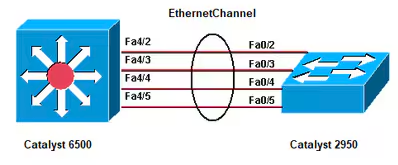
Image courtesy of Cisco Systems, Inc
Cisco StackWise: Use this in access or distribution layers to merge multiple physical switches into one logical unit, simplifying management and giving you instant cable failover.
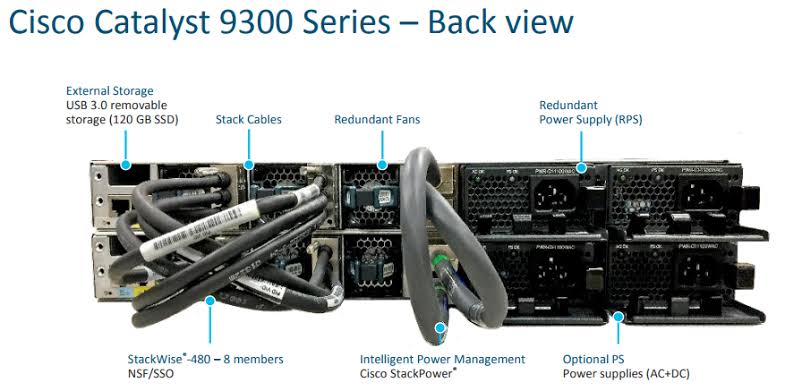
Image courtesy of Cisco Systems, Inc
StackWise Virtual (SVL):Merges two high-end distribution or core switches (like Catalyst 9500 or 9600) into one logical unit using standard high-speed network ports (10G/40G/100G) instead of special stacking cables.
Use this at the Distribution or Core layers to create an active-active switch pair, letting you run Multi-Chassis EtherChannel (MEC) to your access layer.
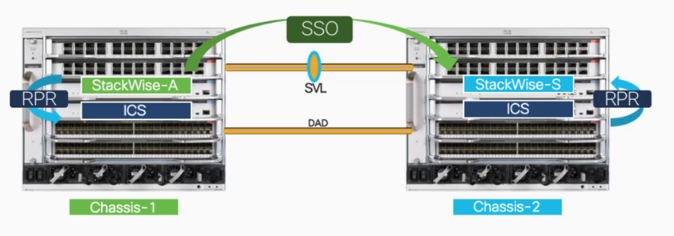
Image courtesy of Cisco Systems, Inc
Dual Supervisor Engines: Use this strictly on high-end core or distribution modular chassis switches where zero downtime is mandatory for the entire enterprise backbone.
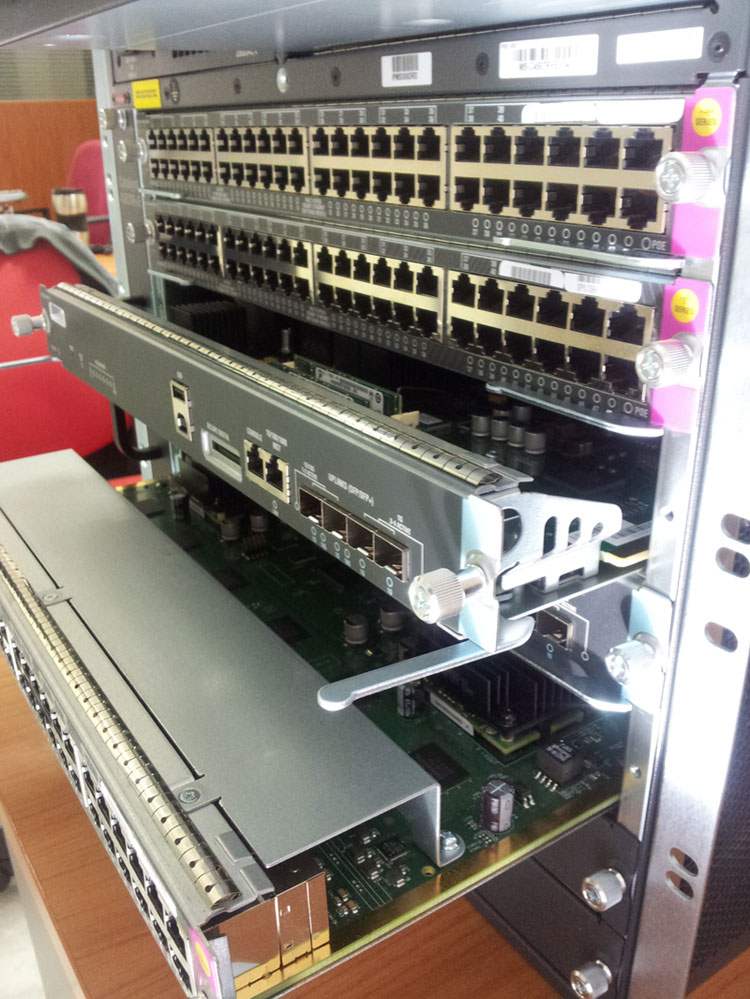
Image courtesy of Cisco Systems, Inc
Scalability
EtherChannel: Scales bandwidth easily by letting you bundle up to 8 active physical ports into a single high-speed logical link as traffic grows.
Cisco StackWise: Scales out your port density effortlessly because you can just stack another physical switch onto the ring without changing your network configurations.
StackWise Virtual (SVL): Bounded. It strictly supports only two physical switches in the pair, meaning you can’t scale it out past two boxes.
Dual Supervisor Engines: Scales your uptime security perfectly by mirroring all routing tables and system states to a backup chip, ready to take over with zero disruption.
Complexity & Cost
EtherChannel: Very cheap and simple since it only requires basic configuration commands to group existing physical ports together without buying extra hardware.
Cisco StackWise: Moderately expensive because you have to buy matching switch models and specialized, proprietary stacking cables to link the backplanes together.
StackWise Virtual (SVL): High. The switches themselves are premium enterprise hardware, and you have to configure dedicated virtual links (SVL) and dual-active detection (DAD) links to prevent split-brain issues.
Dual Supervisor Engines: Extremely expensive and complex because buying a second, redundant brain card for a modular chassis switch often doubles the hardware cost.
Performance Limitations
EtherChannel: Performance is excellent, but it can suffer from uneven traffic distribution if your load-balancing hashing algorithm doesn’t match your network traffic type.
Cisco StackWise: Limited by the total stack ring bandwidth, meaning if you chain too many switches together, the backplane cable can become a performance bottleneck.
StackWise Virtual (SVL): Extremely low. It uses standard high-speed line-rate ports for transport, giving you massive, unblocked throughput across both chassis.
Dual Supervisor Engines: Virtually zero performance limits because the standby engine sits in a hot-swappable state, processing zero user traffic until a total primary failure occurs.
Stateful Switchover (SSO)
Core & Distribution Layers: Use this strictly on high-end modular chassis switches (like Cisco Catalyst 9600) to ensure the entire network backbone stays online if a supervisor engine crashes.
Mission-Critical Networks: Ideal for environments like hospitals, financial institutions, or data centers where a few seconds of network downtime or dropped routing sessions can cause massive business losses.
High-Density Wireless: Use this on redundant Wireless LAN Controllers (WLCs) so that thousands of access points and Wi-Fi users don’t drop their connections if the primary controller dies.
Scalability
Zero-Touch Failover Scale: It scales your network’s uptime seamlessly because it handles failover in milliseconds, regardless of how many thousands of routes or MAC addresses are active in the database.
Dynamic Table Mirroring: It automatically synchronizes the Forwarding Information Base (FIB) and routing data to the standby card in real time, meaning the system doesn’t have to relearn anything as the network grows.
Non-Disruptive Node Growth: You can scale up your chassis port density by adding new line cards without worrying about increasing your failover times or overloading the standby engine.
Complexity & Cost
Insanely High Hardware Costs: To use SSO, you are forced to buy two identical, incredibly expensive supervisor engine cards to plug into the same physical chassis.
Premium Software Requirements: It requires advanced software feature sets or enterprise licenses to unlock the sub-second stateful synchronization between the dual brains.
Behind-the-Scenes Sync Complexity: While it works automatically once turned on, the switch hardware has to constantly run complex background syncing loops to keep the standby card’s memory 100% identical to the active card.
Performance Limitations
Zero Traffic Drop: Because the standby card is pre-loaded with the exact same forwarding tables, it takes over instantly (hot-standby), meaning user data packets keep moving without hitting a performance bottleneck.
Saves the Control Plane: Unlike standard failover methods that drop your routing protocols (like OSPF or BGP), SSO works with Non-Stop Routing (NSR) to keep those routing sessions completely alive during a crash.
Standby Idle Overhead: The only real limitation is that the expensive standby supervisor card sits completely idle and processes zero active network traffic during normal operations, acting purely as a safety net.
First Hop Redundancy Protocols (FHRP)
Link to FHRP Under the hood Blog Post
Wrapping Up
Look, there’s no “best” network design out there just the one that actually fits what you’re trying to do. If you’re running one building with a couple hundred users, you don’t need Spine-Leaf hardware sitting in your closet. And if you’re running a data center, good luck getting away with a flat 2-Tier setup.
3-Tier and 2-Tier are still the bread and butter for most campus networks out there. Spine-Leaf owns the data center game. And stuff like SD-Access and Cloud Network Design? That’s basically where networking is heading more automated, more identity-driven, less “physical box in a closet.”
One thing that doesn’t change no matter which design you pick: redundancy and fast convergence aren’t optional. EtherChannel, StackWise, SSO, FHRP whatever combo you use, that’s what keeps your network from face-planting the second something breaks. So pick your topology first, then figure out how you’re gonna keep it up when things go sideways.